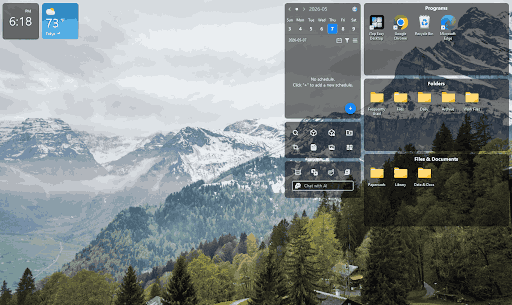
I am the kind of person who saves everything to the desktop. Files, shortcuts, old downloads, random screenshots, all piling up into one giant mess. I kept telling myself I would clean it up later. But later never came.
I tried manually organizing my desktop a few times. I made folders, sorted icons, and spent a full hour getting things neat. But within a week, the clutter was back. I needed a real fix. That is when I found iTop Easy Desktop.
What Is iTop Easy Desktop?
iTop Easy Desktop is a free desktop organizer software built for Windows 10 and 11. It lets you group your icons into neat boxes, change your wallpaper, use handy widgets, and even chat with a built-in AI assistant. I had low expectations when I first downloaded it. I was completely wrong to doubt it.
The app is about 100 MB and takes under two minutes to install. Once it opens, you see a clean and simple layout. Nothing feels complicated or hidden. You get right into using it from the first minute.
How to Set It Up in 4 Simple Steps
Step 1: Download and Install
Go to the official iTop Easy Desktop page and grab the free setup file. Install it just like any normal Windows program. The whole process takes under two minutes and you need zero tech skills to get it done.
Step 2: Group Your Icons Into Boxes
After running iTop Easy Desktop, it will automatically group the documents, and you can then manually modify them according to your preferences. You can name each box whatever you like. I made one box for work documents, one for daily tools, and one for personal files. Everything now has its own home, and I can find things in seconds.
Step 3: Pick a Fresh Wallpaper
Click the wallpaper section inside the app. Browse through a large built-in collection or upload your own image. I found one I loved in under a minute. My desktop looked completely fresh and new right away. You can even browse all wallpapers uploaded by a specific user just by clicking their avatar.
Step 4: Try the Widgets and AI Assistant
You can access the widget panel and add a clock, weather, or a note to the desktop. Then have a chat with PawPal, which is an animated AI cat. She walks around your screen, answers your questions, and sets reminders. It sounds quirky, but it actually works well and adds a fun element to your day.
What I Really Like About It
Getting Rid of the Clutter
The very first thing I noticed was how easy it was to organize everything. I could group all my desktop icons into personalized boxes with just a few clicks. No more scattered files and no more wasted time searching for things.
Hiding Everything with One Click
One of my favorite features is the ability to hide all icons instantly with a simple double-click. Whenever I need a clean and distraction-free screen, I just double-click and everything disappears.
Making My Desktop Feel Like Mine
Before iTop Easy Desktop, my desktop looked just like every other boring Windows screen. With the wallpaper options and personalization tools, I was able to design a workspace that actually reflects my personality.
Having an AI Assistant Right on My Desktop
Whenever I get stuck on something, I no longer have to switch between tabs or open multiple apps. The built-in AI Assistant helps me with quick answers, translations and content summaries all without leaving my desktop.
A Companion That Keeps Me on Track
The new AI PawPal feature adds a fun and practical touch to my daily routine. She wanders around my desktop, sends me reminders and keeps me company during long work sessions. It sounds simple but having a little companion on screen actually helps me stay on schedule.
What Could Be Better
PawPal is a lot of fun but she can sometimes walk right over the area where you are typing or reading. I wish there was a quick button to pause her movement during focused work sessions without fully closing the assistant.
The app also works only on Windows 10 and 11. If you use an older version of Windows you are limited to an older release that misses the newest features. Users on Windows 7 or 8 will not get PawPal or the improved box controls.
Final Take
I have tested a few desktop tools before. Most of them either do too little or feel too complex for everyday users. iTop Easy Desktop sits right in the sweet spot. It is simple, free, and packed with features that actually make a difference in how you use your computer.
If your desktop looks anything like mine used to, give this desktop organizer software a real try. You do not need any technical skills to get started. Just download, install, and begin organizing. You can find iTop Easy Desktop on the official website and start transforming your workspace today. I wish I had found it sooner.