Quick Answer Box
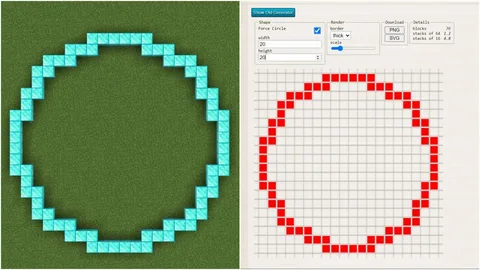
Minecraft circle generators are web-based software programs which assist users in creating accurate and precise circles in the game. Users simply have to input either the diameter or the radius of the desired circle, and the software will automatically create a grid indicating the exact placement for each block.
Introduction
Building perfect shapes in Minecraft can be challenging because the game world is based on square blocks. Circles, spheres, and curved structures often look uneven if you try to build them by hand.
That’s where a minecraft circle generator becomes extremely useful.
These tools calculate the exact block positions needed to form smooth circular designs. Instead of estimating where blocks should go, players receive a visual grid layout that shows the correct placement.
In this guide, you will learn:
- What a Minecraft circle generator is
- How circle generators work
- The best tools used by builders
- A step-by-step guide to generating circles
- Practical building tips for large structures
Whether you’re creating a floating island, arena, tower, dome, or pixel art, using a circle generator will save time and improve accuracy.
You can also read about subway surfers unblocked
What Is a Minecraft Circle Generator?
A Minecraft Circle Generator is a digital tool that calculates the block pattern needed to build a circular shape in a block-based grid like Minecraft.
Because Minecraft uses square blocks, perfect geometric curves do not naturally exist. A circle generator solves this problem by converting a mathematical circle into a pixel-based grid pattern.
In simple terms:
- You enter a radius or diameter
- The generator calculates the block coordinates
- A visual grid shows where to place blocks
This produces a pixel-perfect circle inside the Minecraft grid system.
These generators are widely used for:
- Dome roofs
- Circular towers
- Arena floors
- Decorative builds
- Pixel art
- Large architectural builds
Many professional builders use them when recreating real-world landmarks like the Taj Mahal, Empire State Building, or Chrysler Building inside Minecraft.
Why Circles Are Hard to Build in Minecraft
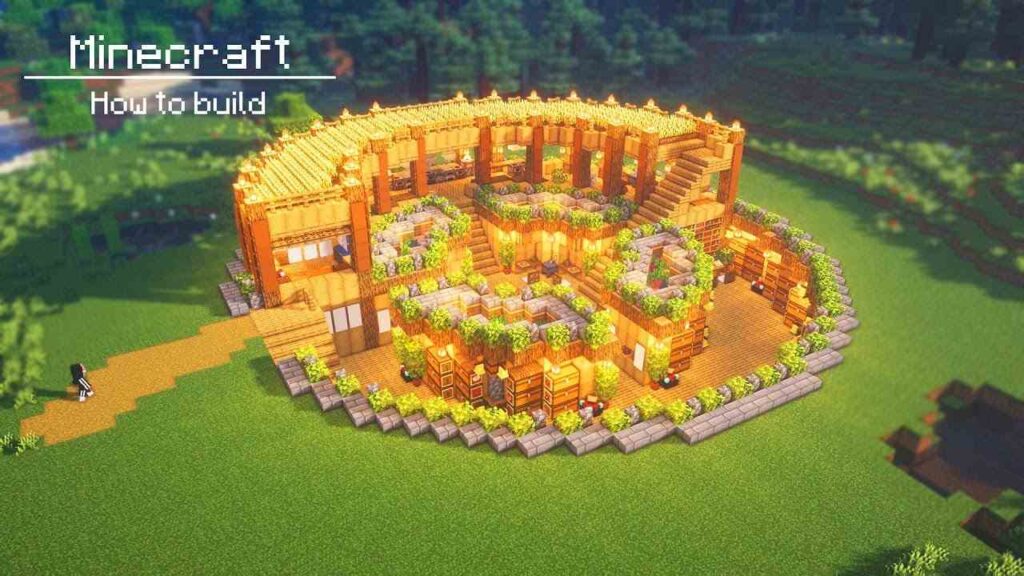
Minecraft uses a grid layout of square blocks, while circles require curved geometry.
When players attempt to build circles manually, they often encounter problems such as:
- uneven edges
- distorted shapes
- inconsistent block spacing
- symmetry issues
For example:
A 20-block diameter circle might require different block counts per row such as:
- 4 blocks
- 6 blocks
- 8 blocks
- 10 blocks
Without a reference pattern, it becomes extremely difficult to maintain symmetry.
A circle generator in minecraft removes the guesswork by calculating the correct pattern instantly.
You can also read about drift hunters unblocked
How a Circle Generator Minecraft Tool Works
Most circle minecraft generator tools use simple geometry and pixel algorithms.
The process works like this:
- The user enters the circle radius or diameter
- The algorithm calculates the grid coordinates
- The tool converts the shape into a pixel circle
- A block placement guide is displayed
The result is a layout that fits perfectly into Minecraft’s grid system.
These tools are often based on algorithms used in pixel art and computer graphics, sometimes referred to as pixel circle generators.
Best Minecraft Circle Generator Tools
Several reliable tools are used by Minecraft builders worldwide.
| Tool | Developer / Source | Main Features | Best For |
| Plotz Sphere Generator | Plotz.co.uk | Generates circles, domes, spheres, cylinders | Large structures |
| Pixel Circle Generator | Various online tools | Simple radius calculator | Quick builds |
| Minecraft Wiki Guides | Minecraft community documentation | Manual building patterns | Learning geometry |
| Circle Calculators | General geometry tools | Radius and diameter calculations | Planning builds |
One of the most popular tools is the Plotz Sphere Generator, widely used in the Minecraft building community.
It can generate:
- circles
- domes
- spheres
- cylinders
This makes it extremely useful for advanced builds such as floating islands or cliffside houses.
How to Use a Minecraft Circle Generator (Step-by-Step)
Follow this simple process to create accurate circles in Minecraft.
Step 1: Choose a Generator Tool
Open a trusted generator like the Plotz Sphere Generator or another circle calculator designed for Minecraft.
Step 2: Enter the Circle Size
Input either:
- circle radius
- circle diameter
For example:
- Radius 10
- Diameter 20
Step 3: Generate the Layout
The tool will display a visual grid showing the block placement pattern.
Each row shows how many blocks to place.
Step 4: Start Building in Minecraft
Use the grid pattern to place blocks in your world.
Builders usually:
- start from the center
- build outward row by row
- mirror the shape for symmetry
Step 5: Expand into Advanced Shapes
Once the base circle is built, you can transform it into:
- domes
- towers
- arenas
- circular platforms
This method ensures the structure remains perfectly symmetrical.
Example: Building a 15 Block Radius Circle
Here is a simplified example of how a circle layout might look.
| Row | Blocks |
| 1 | 6 |
| 2 | 8 |
| 3 | 10 |
| 4 | 12 |
| 5 | 14 |
| 6 | 15 |
Builders then mirror the layout on the opposite side to complete the circle.
This technique ensures balanced block placement across the entire structure.
Minecraft Circle Generator for 3D Builds
Many tools also support Minecraft circle generator 3d features.
Instead of just flat circles, they generate complex shapes such as:
- spheres
- domes
- cylinders
- curved towers
For example:
A dome roof requires stacking multiple circles of decreasing radius.
Generators automatically calculate these layers.
This approach is widely used when creating:
- castles
- stadium roofs
- fantasy towers
- space stations
The Lowell Sphere concept is often referenced by builders when designing large spherical structures.
Practical Uses for Circle Generators in Minecraft
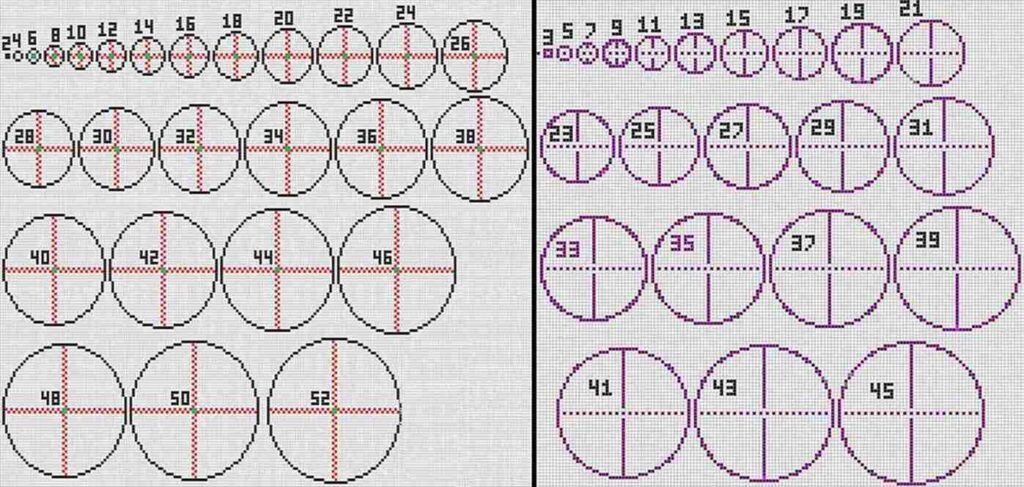
Circle generators are not only for decoration. They are essential for many types of builds.
Popular use cases
- Arena Floors
Circular arenas are common on multiplayer servers.
- Towers
Most medieval towers require circular bases.
- Floating Islands
Many fantasy maps use circular terrain bases.
- Pixel Art
Artists use circle generators for pixel-perfect designs.
- Megabase Builds
Large survival bases often start with a circular layout.
Even famous LEGO designer Sean Kenney and digital designers like Bram Lambrecht have explored similar pixel-based geometry in design systems.
Tips for Building Better Circles in Minecraft
Using a generator is helpful, but good building practices make results even better.
1. Start from the Center
Mark the center block before building outward.
2. Use Symmetry
Always mirror block placement across both axes.
3. Build in Layers
For large circles, construct the shape row by row.
4. Use Scaffolding
Temporary blocks help maintain positioning.
5. Combine with Builder Mode
Some planning tools offer Builder Mode that highlights the current layer being built.
These techniques help maintain accurate grid alignment.
Common Mistakes When Making Circles in Minecraft
Even with generators, players sometimes make errors.
Typical mistakes include
- forgetting to mirror rows
- miscounting block spacing
- starting off-center
- mixing radius and diameter
To avoid these issues, always double-check the block count per row.
A correct grid layout ensures the final circle remains smooth.
FAQ — Minecraft Circle Generator
What is the best circle generator for Minecraft?
One of the most widely used tools is the Plotz Sphere Generator. It allows players to generate circles, domes, spheres, and cylinders with precise block placement guides. Many Minecraft builders rely on it because the visual grid layout is simple and accurate.
How do you make a perfect circle in Minecraft?
The easiest way is to use a circle generator minecraft tool. Enter the desired radius, generate the layout, and follow the block pattern. This ensures the circle remains symmetrical and prevents uneven edges that occur when building by guesswork.
Can Minecraft circle generators create 3D shapes?
Yes. Many tools support 3D structures such as spheres, domes, and cylinders. These generators stack multiple circular layers automatically, making it easier to build complex structures like towers, domes, or planet builds.
Are circle generators allowed on Minecraft servers?
Yes. Circle generators are external planning tools and do not modify the game itself. Players simply use them as visual references while building structures manually inside their Minecraft worlds.
What radius should I use for a Minecraft circle?
The radius depends on the size of your build. Small decorative circles often use a radius of 5–10 blocks, while large builds like arenas or towers may use 20–50 blocks or more. Larger circles generally appear smoother because they use more blocks.
Conclusion
Construction of round structures in a block world is not an easy task, but with the help of a minecraft circle generator, everything becomes possible and simple.
With the help of such generators, you will be able to build perfect spheres, domes, towers, and arenas, ensuring that no space is wasted during construction.
No matter how big or small your project is, whether it is a megabase or a simple circular structure, the use of a circle generator for minecraft will bring perfection to your work.
If you want to enhance your skills in the game, then consider using a circle generator in minecraft.